# Tag
Tags allow you to decorate your script statements for specific behaviors in custom widgets and Interpreters. They are just additional metadata to be used by your own Blueprints/Classes; they do nothing by default.
- A tag instruction starts with a **# (_Hashtag_)** followed by its name.
```q #
- Bob | #mytag
Hello!
- Bob | #tag1 #tag2 #tag3
Multiple tags in the same instruction.
- Bob | #tag1 | #tag2 | #tag3 #tag4
Multiple tags concatenation.
```
!!!
You can place multiple tags in a single instruction or concatenate multiple instructions, both methods result in the same array of tags. A statement can have as many tags as required.
!!!
As a usage example, your project may have a [Dialog Box](../../coding-and-design/widgets/dialog-box.md) widget that shows your character expression when saying a sentence or a [Selection Box](../../coding-and-design/widgets/selection-box.md) widget that colorizes an option.
```q #
- Garfield | #angry | #fast
I hate Mondays!
* Me too. | #blue | #arrow_icon
* I don't care. | #red
```
Your custom widgets will receive these tags as an Array of Strings in its Play event 'Tags' parameter.
---
## Key-Value Pair
A tag can be formatted in a key-value pair pattern using : (Colon) like the example below.
```q #
- Sarah | #animation:idle
Hello!
- Hank | #animation:smile
Hey! Long time no see.
```
On your Interpreter or custom widget, you can check your tags and split the data.
+++ Apple
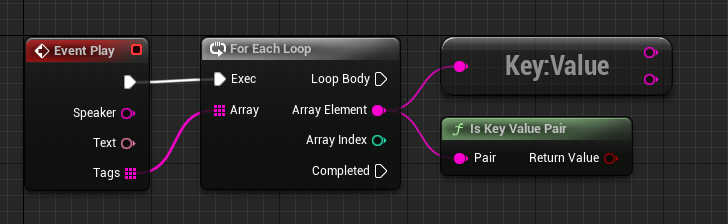
+++ C++
```cpp #
void UMyDialogBox::Play_Implementation(const FString& Speaker, const FText& Text, const TArray& Tags)
{
for (auto& Tag : Tags)
{
if (UTools::IsKeyValuePair(Tag))
{
FString Key, Value;
UTools::ToKeyValuePair(Tag, Key, Value);
// My custom implementation for key-value pair.
}
else
{
// My custom implementation for non key-value pair.
}
}
}
```
+++
---
## Custom Patterns
Notice that tags are simple strings, meaning you can use custom patterns and formats to pass data, and later, you code your widgets and/or Interpreter to identify these patterns and act accordingly.
For example, you can write a tag using commas or semicolons and split the data later in your custom code.
```q
- Bob | #data1;data2;data3;data4
Hello!
- Bob | #list=1,5,3
Hello!
- Bob | #struct:name=move;location=0,0
Hello!
```
---